
In Episode 7 of the podcast, Lou and I touched on wearables and AI. This is the deeper breakdown I promised—though if you want the quick, entertaining version, you can always listen to Episode 7!
In the first article in this series I talked about taking some of the advice from our podcast an putting them into practice in my own life. In this article I’m going to cover a couple of pieces of technology I’m using to support this goal.
Quick note: this isn’t sponsored content, and we receive zero compensation for mentioning these tools. Feel free to swap either out with similar devices or AI models that fit your preferences.
Fitness Tracker + Phone: I use Whoop. I picked it up after seeing a lot of Terminus members with one, and after using it for more than a year, I have a robust dataset for setting baselines and tracking key metrics. It’s a screenless wristband with a companion app.
AI Assistants/Coaches: I use Whoop’s built-in AI (powered by GPT-4) to log my daily CrossFit WODs and workouts. I also rely on Google Gemini Chat and Gemini Notebook to refine my approach across all three core focus areas: sleep, nutrition, and exercise. Gemini Chat has been more valuable to me than Whoop’s AI, largely because of how I use it—a setup I’ll dive into deeper in the next article.
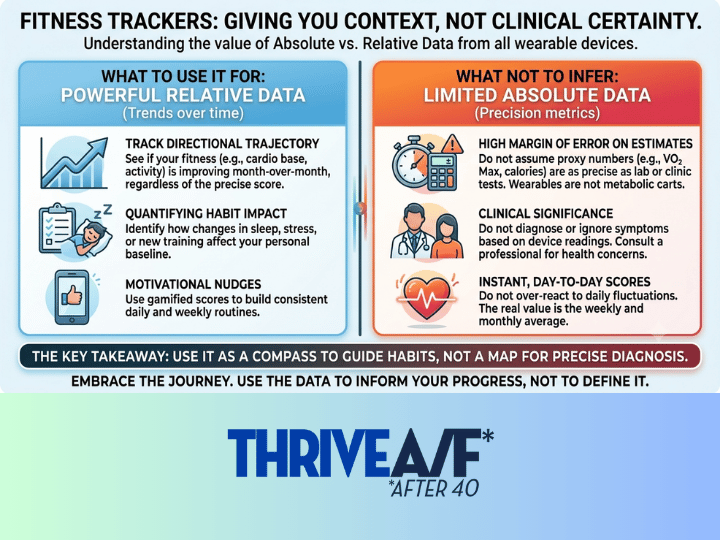
A few things to remember about fitness trackers that we covered on the podcast:
Whoop only measures a handful of raw biological signals. Everything else is an algorithmic proxy.
Wearables are good at tracking directional trends but do not provide absolute accuracy. Wearables generally have a 5–15% margin of error compared to a true lab test.
I’ve been experimenting with how to use this combo for about 45 days, and this is the basic routine I’ve settled into for a “typical” weekday because that’s when I’m most consistent in my routine.
As I mentioned on the podcast, when I write it out like this, it seems like a lot. But now that I have it worked into my routine, it doesn’t take that much time. It took much more time to write it down than it does to execute.
Wake Up and Get Ready (on my phone):
Check Whoop sleep and recovery scores.
Take a screenshot of the Workout of the Day (WOD) from the Terminus scheduling app and upload it into Whoop’s AI, which provides a recommendation on how to approach the WOD based on my morning vitals and history. If I’m running, I replace the WOD with my run plan.
The Whoop AI tracks areas where I have pain or soreness so it understands how I protect my knees and other potential problem areas. I’ve also provided information on common scaling strategies I use in the gym for specific movements (e.g., I typically sub box step-overs for box jumps).
I copy the Whoop morning summary and paste it into an ongoing fitness/nutrition chat thread in Google Gemini. Gemini provides its own POV on the Whoop summary and WOD or run plan.
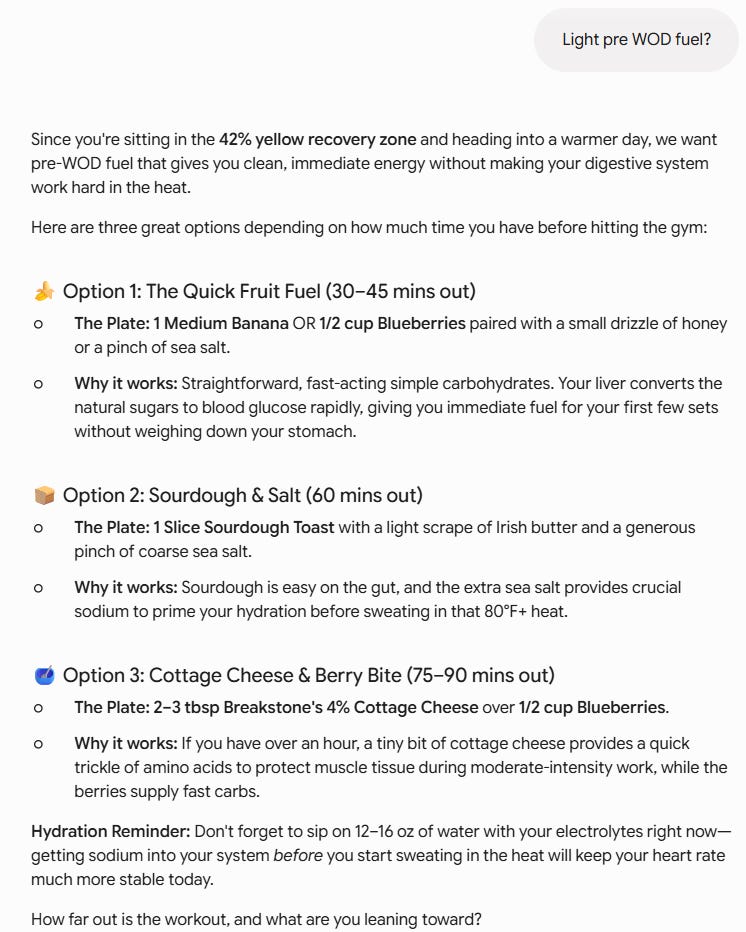
I usually eat a small snack before the gym or run. I have a few standard options, but I’ll ask Gemini for a recommendation and sometimes it gives me advice on what is “optimal” based on the past few days, my recovery score, and the type of workout I’m doing (e.g. short intense intervals vs. longer, sustained runs). This is a pretty typical example:
At the gym or during a run (on my phone)
A typical 1-hour Terminus class starts with a warm-up and then a main WOD or sometimes a strength session + WOD or occasionally just a pure strength day.
Whoop records activity automatically, but it’s more accurate if you start an activity session manually. So when it’s time to start the strength session or WOD, I start an activity session. The two options I use most often are “weightlifting” and “functional fitness”.
Because CrossFit WODs typically involve multiple movements and exercises, I don’t track specific movements unless it’s a strength session. If so, I record exercises (e.g., squats), reps and weight after the session.
If I’m running, I still start a Whoop activity but also use Runkeeper because it provides pacing information during the run.
After the Workout
After the workout, I ask Whoop AI for a summary of results and copy and paste it into Gemini (if It’s a run, I’ll paste a screenshot from Runkeeper as well). If I decide to do a cool down or stack another activity after the WOD, I’ll start a new activity session to record it.
If I haven’t done it already, I’ll get a post-workout meal recommendation from Gemini or tell it what I plan to eat.
Rest of the Day
The main activity for the rest of the day is food logging. I try to take a picture of everything I eat and upload it to the ongoing chat I have going with Gemini. This has been the biggest positive change for me, as I’ve never been good at logging food. It was kind of a hassle at first, but once you get used to it it’s an easy way to track food (and drinks). If I miss a meal I don’t stress about it. A quick summary even without a photo works fine.
The AI is pretty good at estimating calories but that’s not really what I’m after. At first I just wanted to test my ability to maintain a consistent log and then go back and analyze it based on some goals, but I’ve started to use it more as an interactive chat about what to eat and when.
That’s pretty much the routine. The combination of having an ongoing food and exercise log has worked better than I expected, and I’ve been pleasantly surprised at some of the results and insights I’ve been getting from it. That will be the focus of the next article.
Thanks for reading, and if you have your own routine, methods, or thoughts about using this technology to support your goals I’d love to compare notes!
Keith | Thrive A/F Team